Changelog
Releases in the last 12 months
BoltAI 2.16.0
Build 85 This release brings more capable projects, faster AI workflows, and smoother everyday performance, along with a wide range of bug fixes.
New
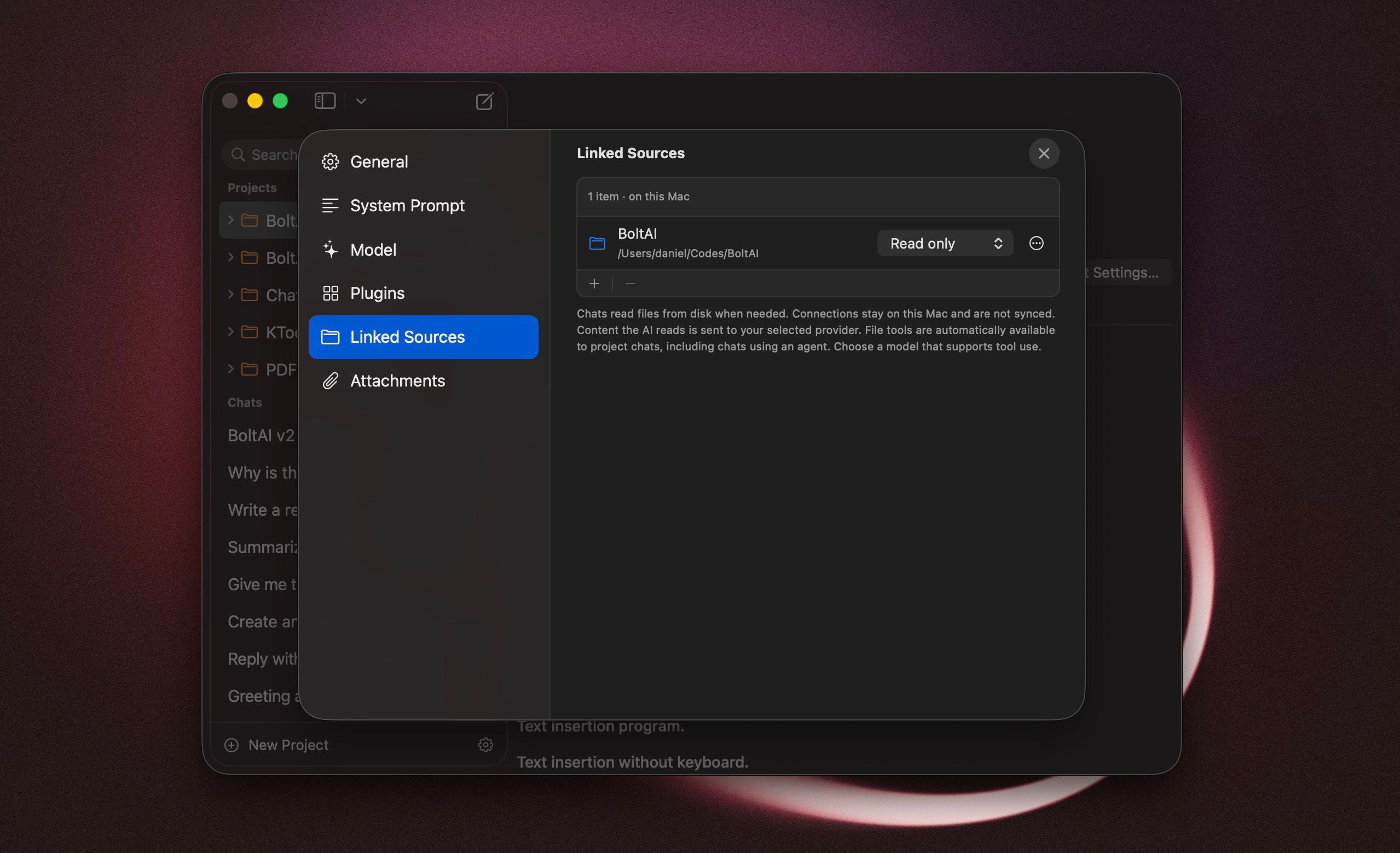
- Projects now support linked files and folders on your Mac. Your AI can search, read, and edit them as you work. This feature is in beta. [ref] [ref]
- Choose a default agent for each project, so new chats start with that agent's instructions, model, and plugins. [ref]
- BoltAI can automatically read AGENTS.md, AGENT.md, and CLAUDE.md from your linked project folders, saving you from copying instructions into each project.
- "Reveal in Sidebar" takes you from a search result to the chat's location, so you can continue browsing your chats without the search filter. [ref]
- You can now connect your OpenRouter account via OAuth instead of manually entering an API key.
- GPT-6 Astra is now available through Codex CLI. Grok gains Extra High reasoning, and supported Claude models have more reasoning levels to choose from. [ref]
- Amazon Bedrock now caches prompts automatically to reduce the cost of reusing the same instructions and context, with a choice of cache duration.
- Approve edits to linked files directly in chat, either once or for the project. If you're in another app, BoltAI can notify you when it needs your approval.
Improved
- Redesigned project settings to make them easier to navigate. You can now drag files and folders into the new-project window to link them.
- Improved startup speed, chat switching, and the display of code in responses.
- You can now disable providers you don't use, including Setapp, to keep the model picker easier to browse. [ref]
- Improved AI workflow performance.
Fixed
- Fixed crashes related to clipboard handling in AI workflows.
- Fixed slow sidebar searches in large chat libraries.
- Fixed code highlighting losing its colors while a response was being generated.
- Claude now shows an error when it returns an empty response, rather than leaving you without a reply or explanation. [ref]
- Interrupted Claude responses are now marked as incomplete instead of looking like a finished answer. [ref]
- PDF attachments that can't be read now show an error instead of being silently left out of your request.
- Fixed errors when continuing a Claude chat after it read a web page. [ref]
- Fixed plugin-related errors when your chat settings limit how much conversation history is included. [ref]
- Switching providers no longer sends plugins that the new provider doesn't support.
- Fixed Mistral responses failing as they finished generating.
- Fixed duplicate responses and empty response controls caused by overlapping requests. [ref]
- Fixed follow-up messages being lost when sent just after pressing Stop. [ref]
- BoltAI now explains when an agent stops because it has reached its step limit, including after a plugin fails.
- Fixed the main window staying hidden when you clicked BoltAI in the Dock or switched to it with Command-Tab. [ref]
- Opening Instant Chat or Workflow Palette no longer unexpectedly brings up the main window. [ref]
- Fixed HEIC photos dragged from Apple Photos being rejected by AI providers.
- Refreshing the model list no longer keeps showing an outdated locally cached list.
- Failed image generation now shows an error instead of leaving an empty response or a stuck progress indicator.
- Fixed requests timing out after 60 seconds despite a longer timeout in Settings.
- Fixed chats remaining selected in Trash after they were deleted or restored. [ref]
BoltAI 2.15.0
Build 84 BoltAI 2.15.0 includes the reliability improvements from the 2.14.2–2.14.4 maintenance releases, together with a cleaner app name and fixes for PDF export and newer versions of macOS.
Improved
- BoltAI downloaded from our website is now simply named BoltAI. New installations use BoltAI.app.
- Improved AI provider errors so useful upstream details are shown when available instead of a generic failure.
- Improved launch stability by loading the Workflow Palette only when it is first used.
Fixed
- Fixed new projects selecting the wrong provider or losing the Base Agent model, generation settings, and loop limit.
- Fixed Anthropic-powered chats occasionally failing after tool calls when using extended thinking through OpenRouter, AWS Bedrock, Anthropic, or Claude Code.
- Fixed AI responses or reasoning disappearing when Cloud Sync refreshed the current chat while a response was still being generated or saved.
- Fixed PDF exports that could contain the chat title but leave message content blank.
- Fixed the Projects section label being partially hidden in the sidebar on macOS 27.
Existing installations: After updating, BoltAI may still appear as BoltAI 2 in the Dock, Spotlight, and app launchers. To update the name, quit BoltAI and rename BoltAI 2.app to BoltAI.app in your Applications folder, then reopen it. Your chats and settings remain available.
BoltAI 2.14.1
Build 78 This release focuses on protecting your chats and provider credentials, improving Cloud Sync and backup recovery, and fixing reliability issues across Instant Chat, project defaults, streaming responses, provider models, and macOS conversation controls.
New
- Added Sync Now to the File menu and sidebar settings menu, using the same safety checks as Cloud Sync settings.
- Added a More menu to Instant Chat for quick access to conversation actions.
Improved
- Improved sidebar search responsiveness and ensured hidden or deleted chats are excluded before results are ranked.
- Improved provider credential syncing so related credential data is transferred together and updated credentials take effect without stale cached values.
- Improved Backup & Restore warnings to distinguish unprotected credentials in the active account from those stored in inactive backup accounts.
- Improved MiniMax model availability with current model discovery, reliable fallback models, and the correct MiniMax M3 identifier.
Fixed
- Fixed API keys incorrectly prompting for a Master Password or appearing encrypted after relaunch, while keeping credential access scoped to the correct BoltAI account.
- Fixed legacy folder deletions that could leave deleted chats searchable or allow chats and attachments to return after Cloud Sync.
- Fixed deleted chats briefly flashing in the sidebar after using Delete Local Data and relaunching BoltAI.
- Fixed Control-click not opening native context menus for chats and projects in the sidebar.
- Fixed Save Temporary Chat and other Conversation commands being disabled or targeting the wrong chat in Instant Chat and companion windows.
- Fixed Instant Chat prompts occasionally being sent more than once.
- Fixed OpenRouter conversations losing reasoning details when continuing an existing chat.
- Fixed Project Defaults appearing to save a provider or model while project cards and newly created chats continued using the previous selection.
- Fixed Return while renaming a project also creating a new chat, and improved the alignment of Project Default controls.
- Fixed incompatible Google Deep Research agents appearing as regular chat models and causing unsupported requests.
- Fixed Last Sync appearing stale during normal use or reverting to Never synced after relaunch.
- Fixed restored backups leaving Cloud Sync unable to reconnect. BoltAI now safely downloads current cloud data before offering the normal Local Account merge flow, while preserving restored local data if recovery cannot continue.
- Fixed partial AI responses disappearing when generation reached an output limit, was stopped, disconnected, or ended with a provider error. Partial text and reasoning are preserved, terminal errors remain visible, and Continue is available when the provider reports an output limit.
- Fixed Retry and Regenerate occasionally failing when an interrupted response had not finished saving.
- Fixed empty completed responses from some providers surfacing an unrelated metadata error instead of the actual result.
BoltAI 2.14.0
Build 77 This update adds complete local backup and restore, new fullscreen companion chat options, support for the latest GPT and Claude models, and improved reliability across Cloud Sync, AI Workflows, MCP connectors, providers, and the macOS interface.
New
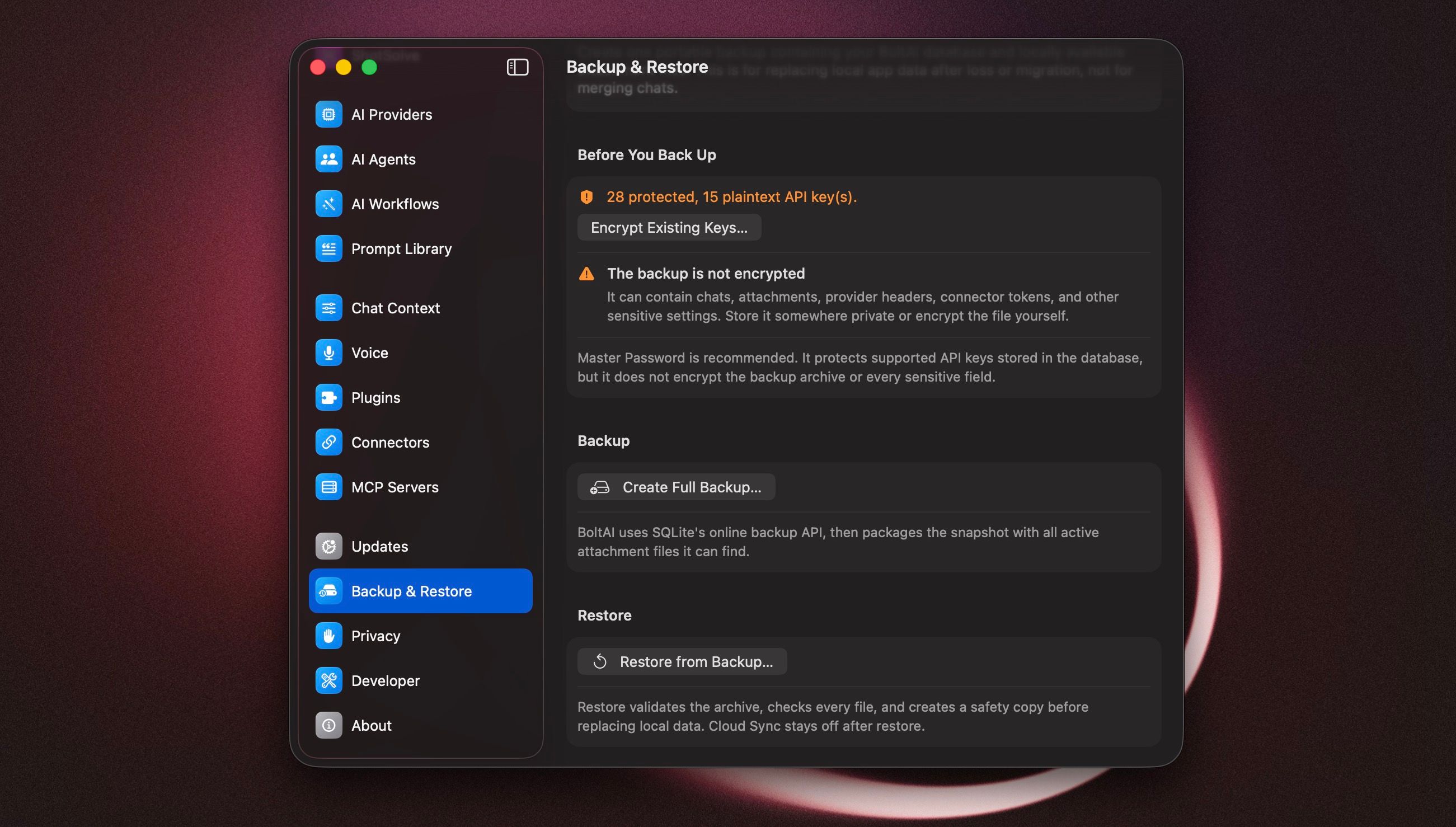
- Added full local backup and restore for your BoltAI database and locally available attachments, with archive validation, safety backups, and guided Cloud Sync recovery. Learn how to back up and restore your BoltAI data.
- Added GPT-5.6 Sol, Terra, and Luna for the Codex CLI provider, plus Max reasoning for supported GPT-5.6 models in the OpenAI and Codex CLI providers.
- Added newer models for the Claude Code provider, including Claude Fable 5, with model-aware thinking controls.
- Added options for New Chat and New Temporary Chat shortcuts to open in the current Space, including when another app is fullscreen.
Improved
- Improved AI Workflows to preserve paragraphs, lists, and inline formatting when working with rich-text apps such as Notes, Obsidian, and Mail.
- Improved MCP compatibility with automatic HTTP connector recovery, provider-compatible tool names, and complete tool input schemas including enums, defaults, and constraints.
- Improved Custom provider model discovery for endpoints with explicit API versions and query parameters.
- Improved Kimi K3 compatibility by applying its required inference settings and clearly explaining which model parameters cannot be customized.
- Clarified Dock and menu-bar visibility settings when BoltAI must keep the Dock icon available for reopening the app.
Fixed
- Fixed long or resumed Cloud Sync sessions that could miss remote changes, lose pending deletes, or fail when matching catalog items existed locally and in the cloud.
- Fixed newer Claude requests that could include unsupported sampling or penalty parameters.
- Fixed Perplexity streaming responses that could fail with a type-validation error.
- Fixed Gemini conversations with tools failing to continue correctly, while preserving image context in follow-up messages.
- Fixed edited provider credentials remaining stale until restart, and improved errors when a stored key cannot be read.
- Fixed ShotSolve reusing content from an existing Instant Chat session instead of starting fresh.
- Fixed Temporary Chat windows not honoring BoltAI's selected Light appearance.
- Fixed unreadable text while renaming selected chats and restored Toggle Inspector for the focused chat.
BoltAI 2.13.5
Build 74 This update focuses on faster account access, chat configuration reliability, reasoning support, and search tool compatibility.
New
- Added passkey sign-in for BoltAI cloud accounts. You can set up your passkey in BoltAI Admin or in BoltAI Web App.
Improved
- Improved OpenAI model setup by hiding non-chat models such as image, realtime, embedding, speech, and moderation models from chat model pickers.
- Improved Claude reasoning support for newer Claude Opus models, including adaptive thinking support where available.
- Improved reasoning setup for Claude models routed through OpenRouter and Bedrock.
Fixed
- Fixed chat settings changes that could take one send too long to apply after changing provider, model, tools, context, agent, or LLM parameters.
- Fixed inspector and compose toolbar changes so the active chat uses the latest saved configuration more reliably.
- Fixed newer Claude Opus requests that could include unsupported sampling parameters when reasoning is enabled.
- Fixed Kagi Search setup and tool requests so they work with Kagi's current Search API.
BoltAI 2.13.4
Build 73 This update adds project duplication and polishes everyday workflows around permissions, shortcuts, licensing, and voice.
New
- Added Duplicate Project to the sidebar so you can copy a project's setup, model configuration, instructions, tools, and project files without copying its chats.
Improved
- Improved menu bar-only login launches so BoltAI keeps a recoverable main window until the menu bar item is ready.
- Improved permission prompts for microphone, speech recognition, screen recording, and Accessibility so it is clearer which setting BoltAI is asking you to enable.
- Improved the first-run shortcut defaults: new installs no longer reserve the Workflow Palette global shortcut by default, while existing users who relied on it keep their shortcut.
- Improved Shortcut settings by showing the Instant Chat Bar shortcut alongside the other global shortcuts.
- Improved voice defaults by using Apple text-to-speech as the default provider for new setups.
Fixed
- Fixed license refreshes that could fail after local device identity was regenerated, such as after a Keychain reset or repair.
- Fixed permission flows that could open System Settings with less helpful context after a denied or not-yet-decided permission state.
- Fixed voice setup copy to better describe voice input rather than generic voice setup.
- Fixed long action tooltips in chat messages so they fit better near the edge of the message row.
- Fixed duplicated projects so attached project files are copied along with the project configuration.
BoltAI 2.13.3
Build 72 is a focused bug-fix and polish update for chat switching, the native sidebar, and Cloud Sync reliability. Switching between chats should feel smoother, with fewer blank states, less flicker, and more reliable recovery when a chat load needs to retry.
Improved
- Improved chat switching so recent messages appear with less unnecessary loading work.
- Improved the renderer so selected chats are less likely to flash an empty message list.
Fixed
- Fixed chat switches that could briefly show an empty message state before the selected chat finished rendering.
- Fixed duplicate message loads during native chat navigation, reducing redundant fetches and visual flicker.
- Fixed retry behavior after a failed chat load so the same chat can load correctly on the next navigation attempt.
- Fixed the native sidebar getting stuck on a bottom
Loading...row after deleting a chat. - Fixed a crash that could prevent automatic Cloud Sync from running reliably in the background.
BoltAI v2.13.1
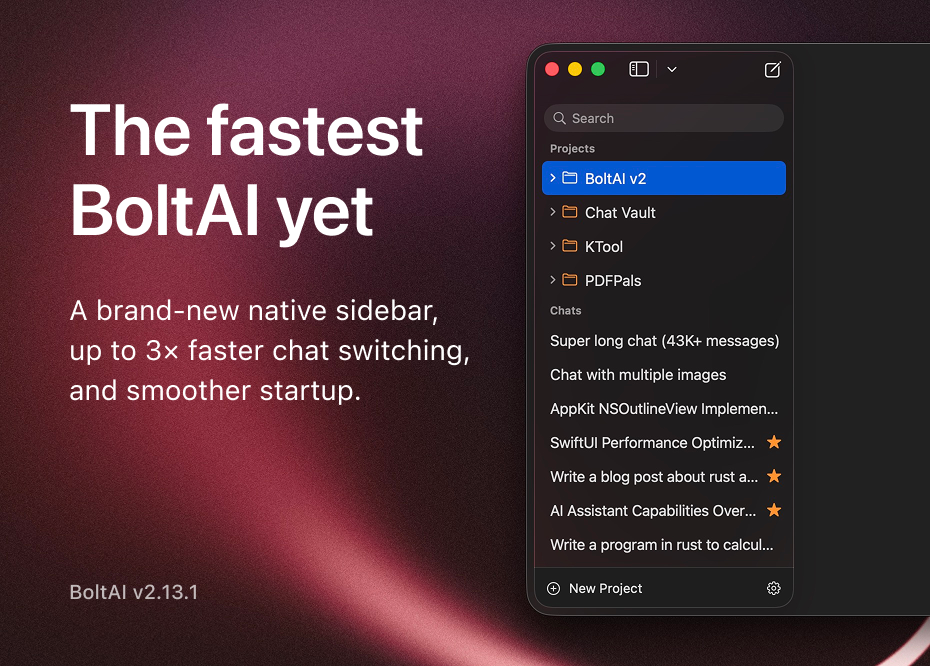
Build 70 The fastest BoltAI release ever shipped. This release focuses on performance across startup, chat switching, and model loading, led by a rebuilt native sidebar that makes chat switching significantly faster and more responsive. It also adds Cloud Account linking for existing license users.
New
- Added Cloud Account linking in Settings, License settings, and startup prompts for existing license users.
- Added support for BoltAI tools when using GitHub Copilot provider setups.
- Added a brand-new sidebar implementation built with AppKit, making chat switching up to 3x faster.
- Added sidebar chat sorting options, including date updated, date created, title, ascending, and descending order.
- Added rich-text-aware workflow output with a new Auto mode, so rich selections can produce styled results while Raw output stays exact.
- Added a resizable workflow preview panel for larger outputs and diff previews.
Improved
- Improved cold start performance so BoltAI opens and becomes ready faster.
- Improved model picker responsiveness when a provider is slow, offline, or loading a large model catalog.
- Reduced chat runtime overhead for providers with very large model catalogs.
- Sidebar responsiveness is better when switching chats with clicks, keyboard shortcuts, and command-number navigation.
- Sidebar actions such as archive, delete, favorite, move, drag and drop, and context menus continue to work more reliably in the native sidebar.
- Improved sidebar row alignment and favorite-button positioning, especially for chats shown inside folders.
- Improved native sidebar multi-selection feedback, including clearer selected-item counts and context-menu behavior.
- Renaming chats is now more predictable: use double-click, or press Return or Enter on a selected chat.
- The inline rename field now has better sizing, font matching, and alignment.
- Settings startup behavior is smoother when loading model data.
- Connector reliability is better when linking or switching cloud accounts.
- Cloud Sync settings now show a clearer sign-in and sign-up experience for cloud accounts.
- Cloud Account and Cloud Sync messaging is clearer for desktop license users.
- Error messages are clearer when encrypted API-key storage is locked.
- Provider switching is more reliable because incompatible conversation state is cleaned up automatically.
- Improved MCP handling for more reliable tool startup, cleanup, and account switching.
- Apple voice recording now uses the same inline recording UI as other voice input providers.
- Workflow previews now render Auto and Rich Text output more naturally, with tighter Markdown spacing and a better layout for long previews.
- Workflow preview windows now make their active and inactive state easier to see, and remember the preview size you last used.
Fixed
- Fixed Featurebase MCP authentication sometimes asking users to sign in repeatedly.
- Fixed chat ordering so service or configuration changes do not bump unrelated chats, while new message activity still keeps recency accurate.
- Fixed cleanup issues for deleted chats inside folders.
- Fixed Gemini image-preview chat models being incorrectly blocked.
- Fixed function-key shortcuts such as F18 and F19 causing menu issues.
- Fixed Save and Regenerate in Instant Chat targeting the wrong chat in some cases.
- Fixed Instant Chat sometimes bringing the main BoltAI window forward unexpectedly.
- Fixed a clipped tooltip on the first message action button.
- Fixed sidebar commands sometimes applying to the wrong chat.
- Fixed selecting chats from a folder detail view so the sidebar and inspector stay in sync with the opened chat.
- Fixed sidebar search spacing on different macOS versions.
- Fixed a startup issue where the sidebar could briefly appear empty.
- Fixed inspector compatibility on macOS 13.
- Fixed favorite actions and drag previews in the native sidebar.
- Fixed native sidebar context-menu actions such as favorite, archive, and trash applying to stale or incorrect selection state.
- Fixed archived or trashed chats remaining visually selected after they were removed from the active chat list.
- Fixed inserted prompts using the wrong text color in the composer.
- Fixed workflow shortcuts sometimes not registering when account or workflow data finished loading after startup.
- Fixed voice transcripts sometimes enabling Send while the visible composer still looked empty.
- Fixed workflow Apply: Copy to Clipboard sometimes copying raw Markdown instead of rich text when Auto output was used with a rich-text source.
- Fixed Rich Text workflow previews showing raw Markdown even though the copied result was correctly formatted.
BoltAI 2.12.1: Better copy, tools, and chat reliability
This update improves how BoltAI handles message copying, tool progress, model settings, sync, and multi-select chat actions.
New
- Copy messages as plain text Copy chat messages without Markdown formatting, useful for pasting into emails, notes, documents, and support replies.
- Turn reasoning off for more models Reasoning can now be turned off for Codex CLI and Claude Opus 4.7.
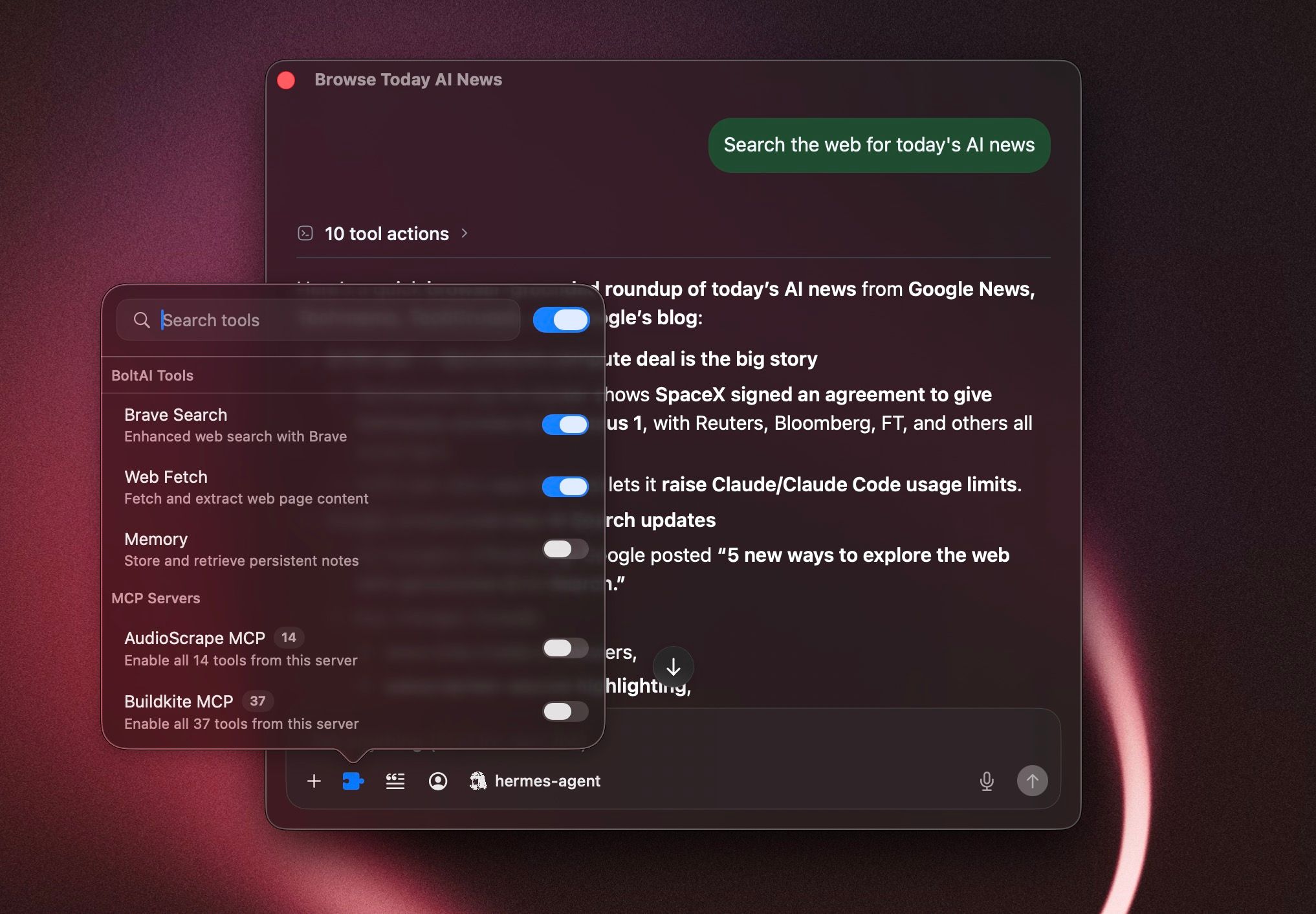
- Clearer tool progress in chats When the assistant uses tools, BoltAI now shows progress more clearly before the final answer appears.
Improved
- Tool calls and tool results now appear in a more reliable order inside assistant messages.
- Sources now appear only after the assistant finishes streaming the response.
- Multi-select sidebar actions now work better for archive, delete, favorite, move, and drag-and-drop.
- Project chats now recover better when their saved model or service is no longer available.
- Links for opening chats, signing in, license actions, and prompt actions now work more reliably on macOS.
- Claude Opus 4.7 reasoning settings now avoid options the model does not support.
Fixed
- Fixed duplicated content when copying rich text from chat messages.
- Fixed sync failures that could happen when chats, messages, and attachments were uploaded out of order.
- Fixed folder move actions when multiple chats are selected.
- Fixed the chat toolbar not updating after changing the selected agent.
- Fixed Gemini CLI chats keeping unavailable Google tools enabled from older settings.
BoltAI 2.12.0
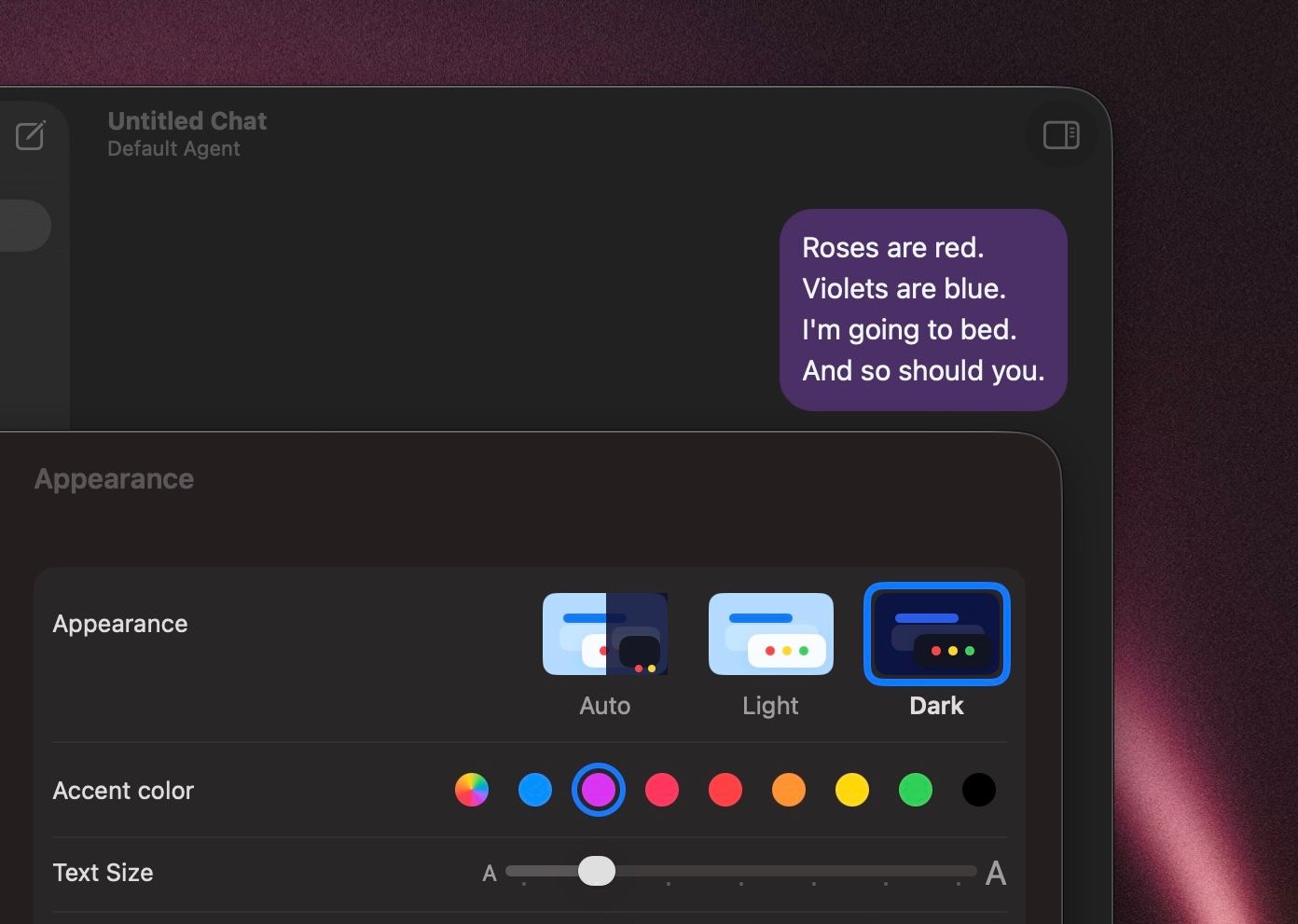
Build 67 This release is focused on appearance, readability, and UI customization. You now get more control over how BoltAI looks, how chat content is presented, and how common actions behave, along with a set of reliability improvements across providers and connectors.
New
- Added chat accent color controls so you can personalize conversation styling.
- Added Config font size in the left sidebar so you can make the sidebar easier to read.
- Added configurable message actions, including separate copy options for Markdown and rich text.
- Added styled workflow output formats for easier clipboard use.
- Added Project Instructions editing in its own dedicated window.
- Added a Continue generating flow for replies that stop because they hit a model output limit.
- Added Fastmail to the hosted connector catalog.
- Added separate Featurebase reader and writer connectors while keeping existing Featurebase connections working.
- Added support for manually entering Bedrock model IDs.
Improved
- The chat header is simpler and more stable, with agent selection moved into the composer.
- The prompt picker is easier to use, and creating a prompt now routes directly to Prompt Library.
- Chat: User preference for "Show full message" is now better supported, with improved message expansion behavior and spacing.
- BoltAI now reuses the selected Codex CLI model when generating chat titles.
- AI service setup does a better job explaining provider verification failures.
- More providers now support turning reasoning off directly from the compose controls.
- Custom OpenAI-compatible providers are more tolerant of non-standard provider responses.
- Connector startup and tool-call handling are more reliable, especially for local tools and mixed argument types.
Fixed
- Fixed regular text copy in chat so standard selection and copy works as expected again.
- Fixed Recently Deleted so project chats stay visible there, with clearer permanent deletion dates.
- Fixed long user messages not expanding correctly.
- Fixed onboarding flows where some users could not complete setup when using a custom provider.
- Fixed Bedrock profile sends that could fail when no API key was stored locally.
- Fixed model catalog refreshes that could be triggered unnecessarily after renaming a service.
- Fixed hosted connector sign-in issues that affected Fastmail OAuth registration.
- Fixed edit-message window sizing so the editor fills resized windows correctly.
- Fixed spacing for the Show full message control.
